








Collections
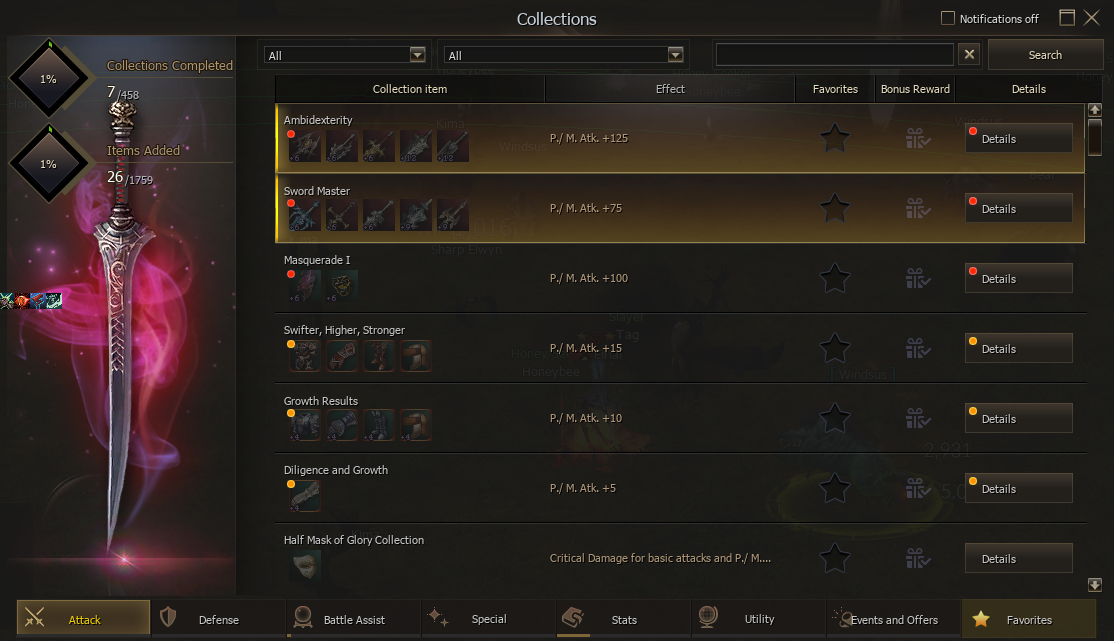
Register specific items to complete permanent stat collections for one character. Requirements vary by item, enchant level and collection, so always inspect the Details window before committing equipment.
Quick Start
The essential rules before registering your first item.
Overview
Collections are sets of required items that award a listed statistic after every slot in the set has been completed. Progress and bonuses belong to the character that completes them. They are not shared across the account.
Most completed effects are permanent and automatically stack with bonuses from other completed Collections. Content under Events and Offers, or any Collection whose tooltip states a duration, is temporary.
How to Access Collections
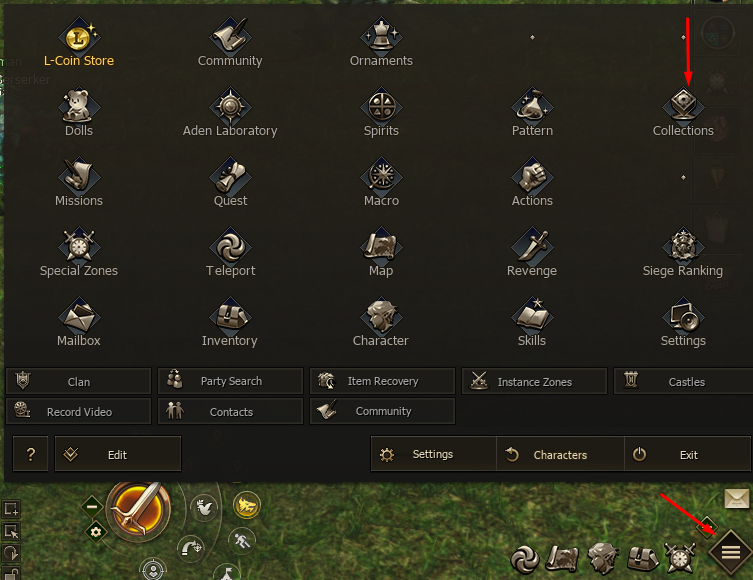
Open the menu from the bottom right corner of the game interface and click Collections.
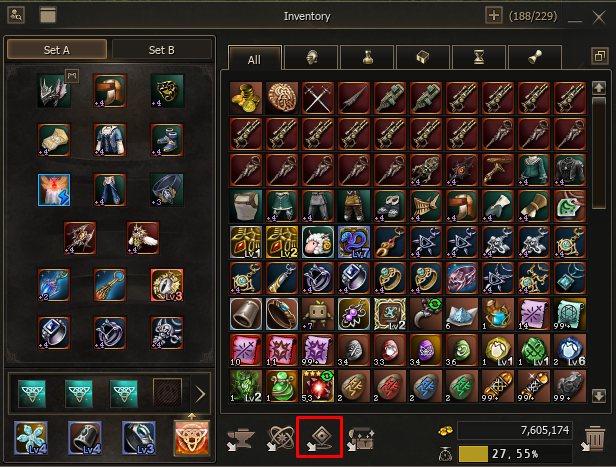
Open the Inventory and click the Collections button along its bottom edge.
Drag an inventory item onto the Collections button to display the Collections in which that item can be registered.
Registering Items
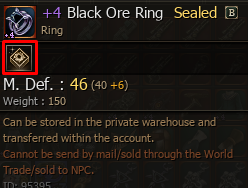
Items that belong to at least one Collection display the Collection icon in their tooltip. Sealed items can be registered, but the item must still meet the exact requirement shown by the Collection.
Select Details beside the desired Collection to view all required slots.
Check the accepted object and its required enchant level before choosing an item.
The selected item is consumed permanently and fills that Collection slot.
Item and Enchant Requirements
Every slot can require a different enchant level. Some Collections also request the same item at different tiers or enchant levels, so owning one version does not automatically satisfy every related slot.
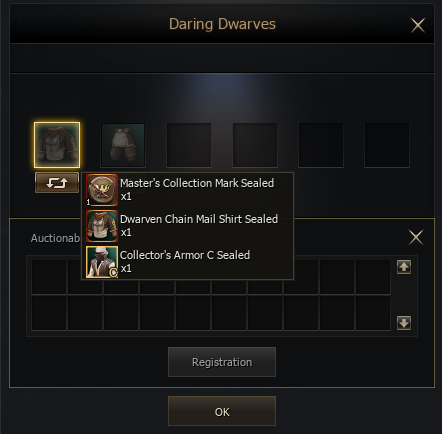
Some slots accept equivalent items. Left click the item shown in the Collection to open the list of valid alternatives before purchasing or upgrading equipment.
Effects and Completion
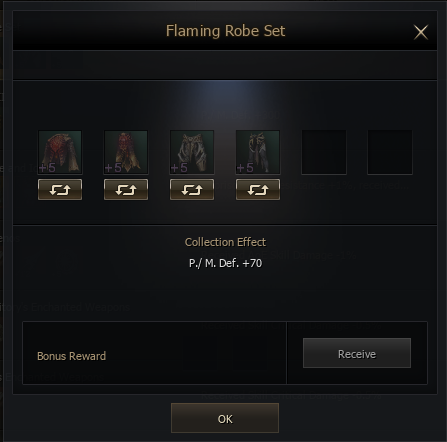
The listed Collection Effect activates only after the entire Collection is complete. Completing one or several individual slots does not grant a partial version of the statistic.
Permanent Collection statistics accumulate, so every completed set contributes to the character at the same time. The area labelled Bonus Reward is tied to completing the Collection and should not be treated as a separate additional reward system.
Categories and Temporary Collections
The main filters are Attack, Defense, Battle Assist, Special, Stats, Utility, Events and Offers, and Favorites. Use them to narrow the list according to the bonus or Collection type you want to inspect.
Events and Offers
This category contains temporary content and is divided into two types:
| Type | Duration |
|---|---|
| Season Collections | Reset on the first day of each month at 06:30 server time. |
| Event Collections | Remain active for the duration stated by that Collection after completion. |
Favorites, Details and Item Search
Click the star beside a Collection to add it to Favorites and locate it quickly later. The Details button opens the full requirement window, including the items that must be registered and the final Collection Effect.
Drag an Item onto Collections
Dragging an inventory item onto the Collections shortcut shows its relevant Collections and adds a colored status point:
| Point | Meaning |
|---|---|
| Yellow | The item can be registered exactly as it is. |
| Red | The item has less enchant than the Collection requires. |
| Blue | The item has more enchant than the Collection requires. |
Obtaining Collection Items
Collection items can come from Random Craft, Purges, Master Collection Marks and town merchants. Compare the required enchant level and accepted alternatives before spending Adena or limited materials.
All Collections are visible, but some required objects are not obtainable yet. More items will become available as the server progresses.
Recommended Collections
Efficient Early Options
If you have excess Adena, inexpensive No Grade items from town merchants can be used to complete accessible P./M. Atk. and P./M. Def. Collections. Skill Cooldown is useful for every class and is worth checking whenever an affordable Collection becomes available.
PvP Priority
- Flat Skill Critical Damage
- Received Skill Damage
- Received Skill Critical Damage
PvE Options
PvE does not have one fixed Collection priority. Useful bonuses include P./M. Atk., Skill Cooldown, Lamp XP and XP. Choose according to your class, current stats, available items and the cost of completing the set.
Common Mistakes
| Mistake | Why It Hurts |
|---|---|
| Registering an equipped or valuable item by accident | Registered items disappear permanently and cannot be recovered. |
| Ignoring the required enchant level | The item may not qualify, or you may overinvest in enchantment that the slot does not need. |
| Buying before checking equivalent items | A cheaper accepted alternative may be available from the same item selector. |
| Expecting partial stats | The Collection Effect activates only after every required slot is complete. |
| Treating progress as account wide | Collections and their bonuses belong to the character that completes them. |
| Ignoring temporary durations | Season and Event Collection effects can expire or reset. |
| Investing in unavailable content | Some visible Collections require objects that have not been unlocked yet. |